Tension Management
How this page is sourced
Sourced from named coaches and communities. Checked against its sources. Not yet reviewed by a person.
Tension is how hard your hand, wrist and arm work to hold and steer the mouse. Managing it means using the right amount of tension, in the right place, at the right time.
- You need some. Too tight a grip jitters ahead of the target. Too loose a grip lags behind it.2
- Spend it in bursts. Tense to start a fast motion, then release before you land.410
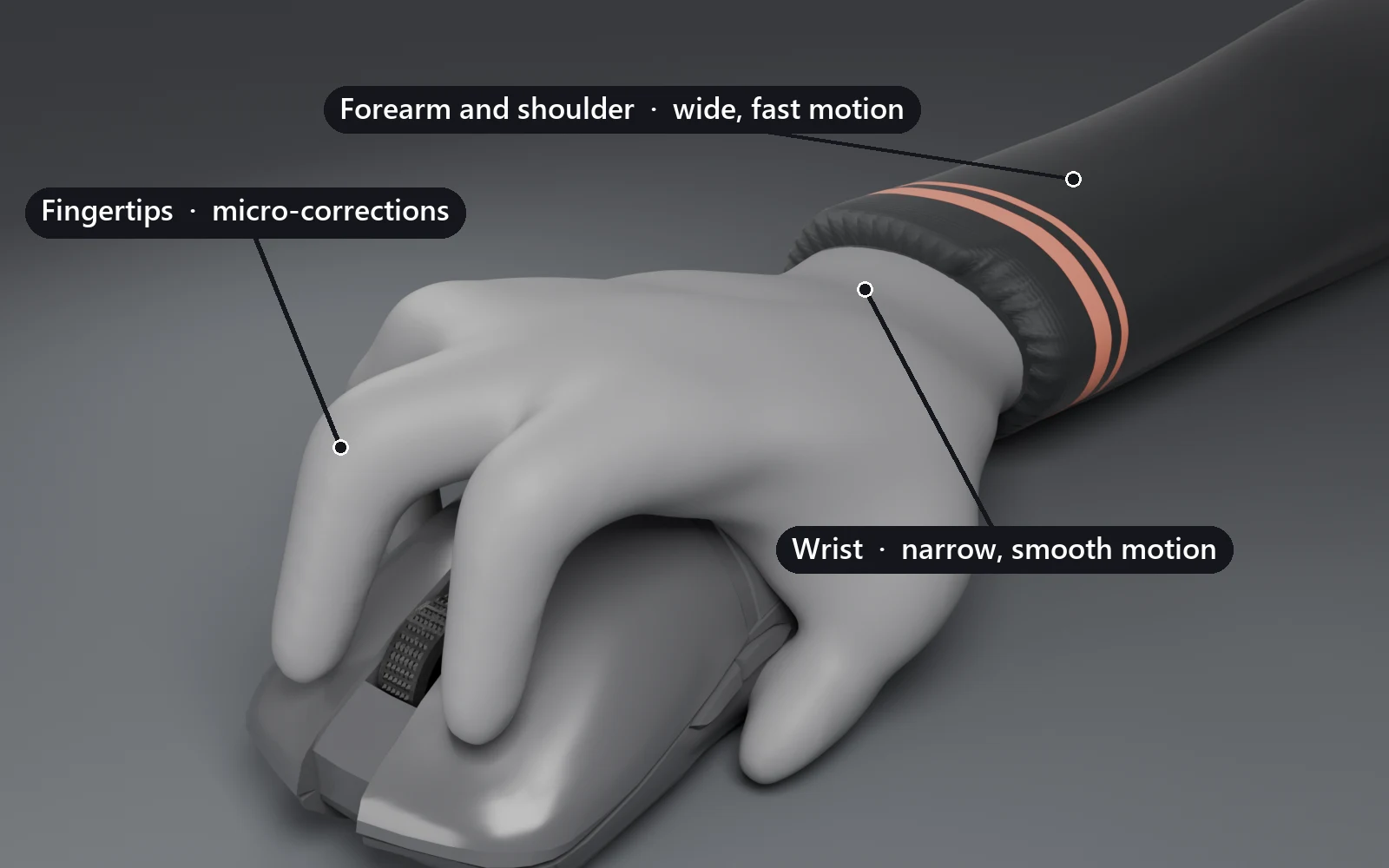
- Put it where the motion is. Arm for wide motion, wrist for narrow, fingertips for micros.68
- Read it on screen. Jitter, overshoot and rushed clicks are often a tension problem before they are an aim problem.212
What tension is
A rigid hold for control. Tension is your hand, wrist and forearm muscles contracting without moving, which turns them into a firmer structure around the mouse. That structure gives you control.1
Held for long stretches, the same contraction can irritate the muscles doing it. The extreme version is called death gripping.1
A balance, not an enemy. Aim advice often sounds like tension should be zero. It should not. Using none can be as harmful as using too much, and some tension always keeps you stable on a target.2
The goal is a secure hold that needs little tension and leaves some finger control free.3
Speed against stability. More tension makes faster movement possible. It also makes that movement less stable, which is why a flick needs a lot of it and a micro-correction needs little.4
A budget you can overspend. Tension is a limited resource you spend across your forearm, wrist and fingertips.5 Spend past the limit and you reach lockout, where you lose control of the whole motion.5
Where tension lives
Forearm and shoulder: wide and fast. The arm suits motions that cover distance, and steadying fast reactions to fast targets.6 In precise tracking, you can feel the shoulder carrying the long strafes.7
Wrist: narrow and smooth. The wrist is more efficient for short, narrow motions, such as a target making short strafes. It is also the joint to favor when smooth tracking matters most.6
Fingertips: micros. Small corrections belong in your lower muscle groups, the fingertips or the wrist, which cuts wasted motion at the end of a fast movement.8 In control tracking, fingertip tension handles vertical adjustments better than the forearm does.9
Blend the joints. Moving with arm and fingers together means neither has to work hard, which reduces tension spikes during large motions.10
Sensitivity moves the load. On a low sensitivity, micros shift into the upper muscle groups, which is easier. It also avoids the harder skill of balancing fingertip tension.8
How the hand holds
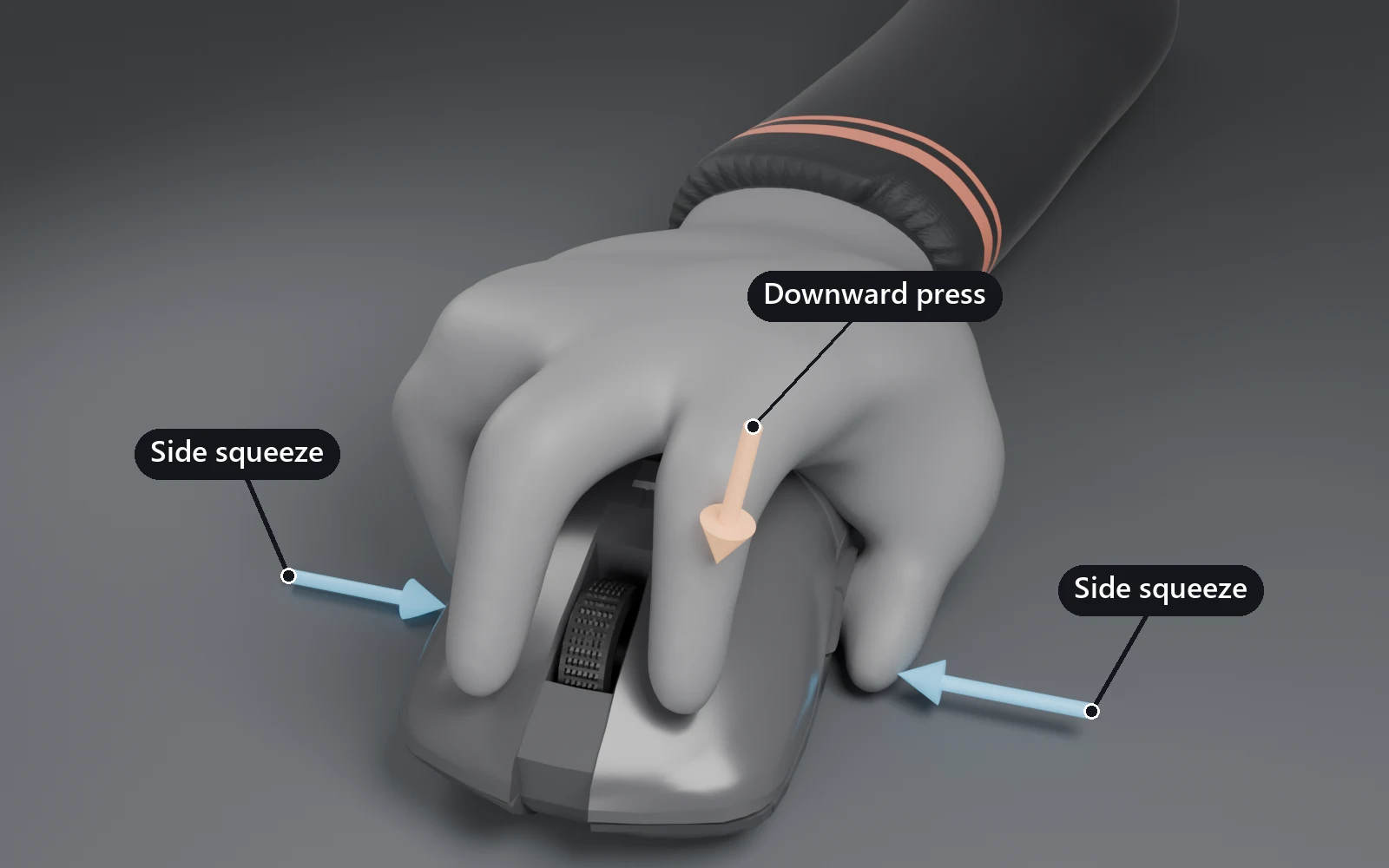
Two forces hold the mouse, and players weigh them differently. Neither approach is the one right answer.
Side squeeze. Your thumb presses against your ring finger or pinky, across the mouse. It gives stability, most of all on long strafes where speed matching matters.7
Relying on it instead of pushing down keeps tracking from turning sticky, so a direction change is easier.2
Downward press. Your index finger or the base of your palm pushes into the pad. It adds control, with extra force at direction changes such as the top of a PGT arc.7
Pressing hard into the pad can come with holding the click. It does not make micro-corrections faster and can make them less fluid.11
Grip style changes the balance. A claw grip holds with a firm, not hard, pinch between thumb, ring finger and pinky.3 A fingertip grip has less support, so it is more prone to lockout and suits a lighter two-finger pinch.3
How to feel it
Watch the crosshair against the target. Too much tension shows as sharp, jerky motion that skips ahead of the target or drifts off course, with a lot of overcorrection.2
Too little shows as stops and breaks in the motion, so the crosshair seems to lag behind and feels sluggish.2
Watch your clicks. Shooting the instant you react spikes tension and makes the motion shaky.12 Relying on heavy tension also raises the urge to spam click.11
Watch your flicks. Curved flicks, or sluggish movement between targets, point to tension you did not prepare before the flick.10 Flicking past targets wastes tension and runs you into lockout quickly.10
Watch for changes, not only amounts. Changes in how much tension you use, or where, coincide with breaks in smoothness.2 If a track breaks at the same point every strafe, check what your hand did there.
Look at your fingertips. Pressing turns the skin of a fingertip pale, so that color change shows how much pressure a single finger is applying.3
Rate your grip. Picture your grip on a scale from 1 to 10. Anything past 8 out of 10 is a grip to unlearn.1
Treat pain as a signal. Pain from gripping hard signals inflamed tendons. Build tendon endurance so the problem does not become lasting damage.1
How to control it
Start from a stable baseline. Use a firm grip that needs little effort to maintain.3 During a long strafe, keep that tension constant instead of adjusting it mid-track.2
Tense, flick, release. Use a lot of tension to start a flick, release it as you approach the target, and keep only a little for the micro-correction.4
Think of the cycle as breathing: prepare the tension for the next flick, flick, then relax.10 Do not shoot until you prepare the next flick, and do not stay tense for long.10
Reflex flicks are the exception. In tactical shooters, add a little tension before a reflex flick. That locks the hand into a small, one-direction zone your reflexes can use quickly.10
Hand tension to the joint that needs it. Landing a flick onto an evasive target works by moving tension from your wrist or forearm into your fingertips to carry the track.9
Against targets with instant acceleration, you spike wrist tension for each flick back on. How smoothly that flick lands depends on how cleanly you let the tension go.9
Withhold it on purpose. Edge tracking needs you to hold back tension so a pivot does not overshoot to the far edge of the target.6 In control tracking, start with loose fingers and smooth, unhurried micro-corrections.5
Ease into a track. Snapping onto a target with a fast flick makes the following track feel jarring. Keep tension fairly low and adjust smoothly onto the target instead.2
Read before you commit. Take a brief moment to process where a target is before moving. That reduces panic reactions without making the aim slower.12
Lower tension also makes the target easier to see, which helps that reading.12
Practice under stress. Do 3 to 5 minutes of hard cardio right before aim training, so you learn to stay composed with your heart rate up.1 Hold the mouse like a baby rabbit.1
Common mistakes
- Chasing zero tension. A grip with none can lag and stall as badly as a tight one jitters.2
- Keeping flick tension after landing, which leaves the micro stiff and drifts toward lockout.10
- Using the forearm for narrow vertical micros in control tracking, where the fingertips do the job.9
- Making micro-corrections fast and explosive, which costs precision unless the control habits are already there.11
- Flicking past targets, which spends tension the next flick needed.10
- Firing the moment you react, which spikes tension before you have read the target.12
Drills
Smoothness scenarios. The TSK benchmarks train tension management, especially their smoothness scenarios.4
Control Sphere and Whisphere. Control Sphere has a strict, learnable pattern that tests how smoothly you react to small changes in acceleration.5 It suits low sensitivities and wrist or finger motion. Whisphere is the better choice for balancing forearm tension at higher sensitivities.5
Withholding on Air bots. On Air Angelic or Air Voltaic, the bots do not strafe erratically. Hold back your tension and movement to gain time on target and edge track.5
One shot per target. In static clicking, take one attempt per target and do not shoot until the tension for the next flick is ready.10 It builds the tense, flick, release cycle.
Reflex flicks at 100%. Play Reflex Flicks Easy, Fair and Hard, and aim for full accuracy on the easy variants to practice consistency.10
Arm and finger blend. Move the mouse up and down with your arm, then add your fingers at the edges of each motion.10 Repeat side to side with arm and wrist, so no single joint has to spike.10
The wrist arc test. Open Paint, lock your fingers and arm, and draw by bending only your wrist. The lines curve instead of running straight, which shows the path your wrist naturally takes.6
Cardio first. Before a session, do 3 to 5 minutes of hard cardio, then train with a relaxed grip.1
Do this next. Play one smoothness scenario twice: once at your usual grip, once noticeably lighter. Note where the jitter or the lag shows up in each run.
Related
- How Aim Works: smoothness and speed matching, the qualities tension control makes possible.
- Setup and Gear: grip styles and posture, the hold tension works through.
- Tracking: precise, reactive and control tracking, where tension balance shows most.
- Clicking: flicks and micro-corrections, which each want a different amount of tension.
- Glossary: underaiming, which depends on the tension control covered here.
- Health and Rest: rest and recovery for the muscles a tight grip overworks.
Resources
- KovaaK's: Control Sphere, Whisphere and the Air bots the drills above use.
- Voltaic: the benchmark with a control tracking subcategory, where these habits get scored.
- Guides: videos on speed matching, grip and control tracking.
References
-
MattyOW, Speed Matching in Precise Tracking, YouTube · REF-67 ↩↩↩↩↩↩↩↩↩↩
-
Ben Staudt, Introduction to Mouse Grips, YouTube · REF-73 ↩↩↩↩↩
-
MattyOW, How to Get Astra in Control Tracking, YouTube · REF-68 ↩↩↩↩↩↩
-
MattyOW, Diagonal Tracking Technique of Hizku - Unraveling the Secrets of Aim Ep. 5, YouTube · REF-70 ↩↩↩↩↩
-
Corporate Serf, KovaaK's Precise Tracking - Mouse Grip and Tension, YouTube · REF-72 ↩↩↩
-
MattyOW, Cartoon, King of Micros - Unraveling the Secrets of Aim Ep. 7, YouTube · REF-71 ↩↩↩
-
MattyOW, 1 Tip for Every Aim Training Category, YouTube · REF-69 ↩↩↩↩
-
Ben Staudt, Flick Control Fundamentals, YouTube · REF-74 ↩↩↩↩↩↩↩↩↩↩↩↩↩
-
Lorys, the KEY approach for AIM CONSISTENCY, YouTube · REF-75 ↩↩↩
-
minigod and Lorys, calm aim is a joke - this is why, YouTube · REF-76 ↩↩↩↩↩