Skip to content

Weakness Targeted Static Flowchart

Written by Bassel Bakr

Written from my own training and experience, not assembled from published sources. Treat it as one informed opinion rather than settled fact.

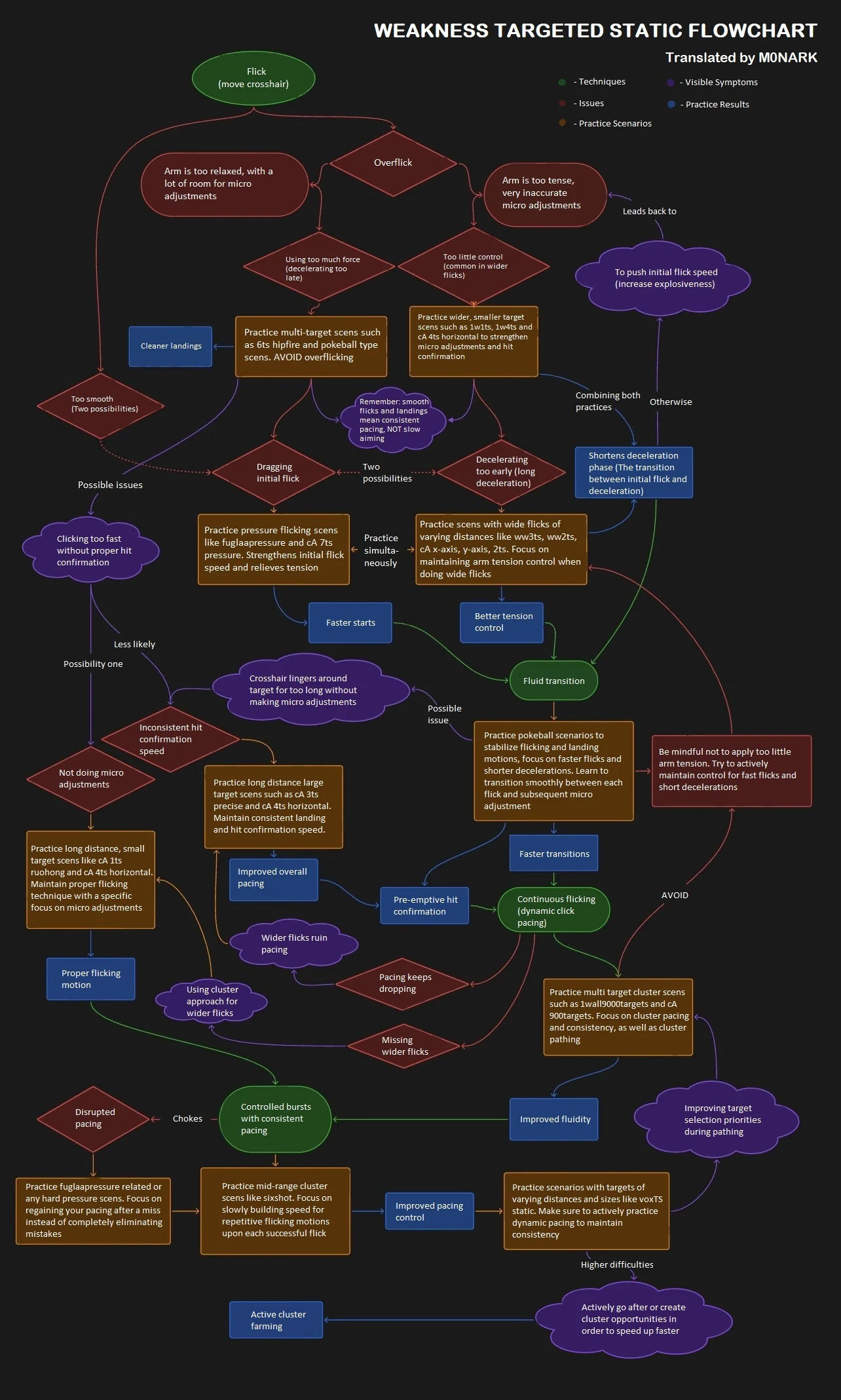
There is a flowchart that circulates in aim communities. You enter it with something you can see yourself doing, follow the arrows, and come out holding a scenario to play.

It has forty-eight nodes. Each one names a movement, and a still box cannot show a movement. So every node is drawn here as an animation. Point at one and it plays.

The chart tells you what to do. This page shows you what it means. Below is what I think it gets right, and the one branch I do not follow.

  • It asks the right first question. Not what you score. What the crosshair does.
  • One symptom can have several causes. Overshooting is its own example.
  • Scenario names change. Shapes do not. The drawings show shapes, not names.
  • One branch goes against a page here that has sources. I say which, and why.
A branching diagnostic chart for static clicking. Five kinds of node: green techniques, red issues, purple symptoms, orange practice scenarios and blue results.
Point at a node to see it move. Weakness targeted static flowchart, posted by M0NARK in March 2025, who presents it as his translation of a Chinese original. jizu was circulating that original a month earlier and credits it to violat3, whose account no longer exists. No licence stated. Reproduced with its source credited, and not under this site's CC BY-SA 4.0 licence.

Putting it here does not mean I agree with all of it. Treat it as a map, not as orders.

The image itself is untouched. Invisible buttons sit on top, one over each node's text, measured from the image rather than placed by hand.

Hover previews, a click pins so the pointer can leave, and Escape unpins. Tab reaches every node, and Enter opens one.

How to read this page

The chart uses five kinds of node: a technique, a problem, something you notice, a scenario to play, and a result to expect. Each kind is drawn the same way every time.

One path through a diagnostic chart, built up a step at a time from the top down. A cloud arrives first, naming the symptom: the crosshair sails past the target. An arrow draws downward from it and a red diamond arrives, naming the issue it points to, braking too late. A second arrow draws and a green rounded box arrives with the technique to change, commit and stop. A third arrow draws and a filled box arrives describing the scenario to play by its shape rather than by a name: one wall, two targets, short travel. A fourth arrow draws and a box with a double edge arrives with the result to expect, fewer corrections. Each of the five nodes has a different outline, so the kind of node can be read from its shape rather than from its colour. The path then clears and builds again.Bassel Bakrhttps://github.com/Bassel-Bakr/aimOne walk through the chartfive kinds of node, five shapesit sails past the targetSymptomwhat you sawbraking too lateIssuewhat it points tocommit and stopTechniquewhat to changeone wall · two targets · short travelScenariowhat to playfewer correctionsResultwhat to expect
One walk through the chart, from something you saw to something you play. Five kinds of node, each a different shape.

The drawings name no scenarios, on purpose. The people who make them rename them and take them down. A name stuck inside a drawing is the first thing to go out of date.

The shape lasts longer. One wall or many. One target or a cluster. Small and far, or big and close. Read the shape, then find anything in your trainer that matches it.

Side by side

Point at a node and you get that node on its own. Some things only show up when you watch two at once, side by side. That is what these two drawings are for.

You start from something you saw yourself do, not from a score. Three movements are worth telling apart. A crosshair that flies past the target. One that crawls the last bit. One that shoots before it has stopped.

Three panels, each with the same target, the same starting point and the same clock, so only the shape of the motion can differ. In the first the crosshair flicks out past the target and comes back, and its trail loops out above the line and returns below it. In the second it covers most of the distance quickly and then inches the last short stretch, so its trail dots crowd together just short of the target. In the third the motion is ordinary but the shot mark falls early, while the crosshair is still short of the target and still settling. Every dot is one tick of the shared clock, so where the dots crowd the crosshair was slow.Bassel Bakrhttps://github.com/Bassel-Bakr/aimIt sails pastout past the target, then backshotIt creeps inmost of the way fast, the rest a crawlshotThe shot goes earlythe trigger beats the crosshairshotOne clock for all three. The dots crowd where the crosshair was slow.
The three, side by side on one clock. Same target, same distance, and the difference is the shape of the motion rather than its speed.

The chart's best idea is that overshooting is not one problem. It splits an overflick two ways: an arm that is too tense, and one that is too loose. The two lead to opposite drills.

A score cannot tell you which one you are doing. Neither can one node on its own. Two players miss the same way and need opposite fixes.

One target at one distance, flicked to three ways at once. The tense arm throws the crosshair out fastest and brakes too late: it sails well past the target, hauls back, and the shot goes while it is still long. The loose arm fails the other way round, slowing far too early and dragging the last stretch at a crawl, so the trigger goes with the crosshair still short of the target, which it never reaches at all. The balanced arm travels once, settles on the target and stops there. A faint trail behind each crosshair keeps the furthest point it got to visible after it has moved on, and a ring or a crossed ring marks where each shot landed. The bar under each lane splits the shot into flick time and correction time, so what the two failures cost shows up as the longer second block.Bassel Bakrhttps://github.com/Bassel-Bakr/aimToo much tensionbrakes late, then hauls it backsails pastFlickCorrection260 msToo little tensionslows far too early, drags in shortnever gets thereFlickCorrection335 msBalancedone motion, lands and stopsFlick183 msone flick, start to triggersame target, same distance
A tense arm sails past, a loose one never arrives, and a balanced one lands and stops. The bar under each lane is what the correction cost.

The branch I do not follow

The chart routes a relaxed arm to overflicking. This site's own page on tension says the opposite, and cites a source for it. A loose grip lags behind the target rather than sailing past it.

I go with the page. A loose arm gives me a late, dragging flick, and that needs a different fix from a tense overshoot.

The chart's answer here is to tense up more. That has never worked for me.

I usually notice it afterwards. If my hand aches an hour into a session, I was holding tension I did not need. A loose arm does not leave my hand aching.

One target crossed three times, by a slow hand, a faster one and a fastest one. In each pass the crosshair sweeps across the target and the button goes down while it is still travelling, rather than after it has settled. The strip under each lane is the mouse button, held from the press until the shot registers, and it is the same length in all three passes. Because the crosshair keeps moving through that window, the shot lands where the crosshair was when it registered rather than where it was aimed, and a bracket under each lane measures the gap between the two. The slow pass leaves a gap narrow enough that the shot is still on the target, the faster pass leaves one that puts the shot on the rim, and the fastest pass leaves a gap wider than the target, so the shot lands clear of it and is marked as a miss. The wait never changes across the three; only the distance it costs does.Bassel Bakrhttps://github.com/Bassel-Bakr/aimSlowhardly moves while the shot resolvesaimedgap, still onpressshot registersFasterthe same wait, more ground coveredgap, on the rimpressshot registersFastestsame wait again, the shot lands past the targetgap, off the targetpressshot registersThe button is held the same span in all three. Only the distance changes.
A flick still travelling when the shot goes. The faster the hand is moving at the click, the further the shot lands from where it was aimed.

What the chart cannot show

A flowchart gives one cause per problem. It has to, because an arrow only points one way. Most misses have more than one cause.

When I end up with two, I try the easier one first. The cheap fix often helps the hard problem anyway. If it does not, at least I have ruled it out.

The blue nodes name a result and stop. Cleaner landings, faster starts, less wasted movement. Watching one happen looks like a group of shots tightening, not a number going up.

Two panels, Run A and Run B, each putting the same nine shots on the same target on the same clock. The shots land one at a time, and a ring around the aim point resizes after every shot to follow how far from the middle the shots are sitting. In Run A the ring stays wide the whole way through, wobbling but never closing. In Run B the ring opens just as wide and then closes in as the later shots land near the aim point. Only once both runs have finished does the hit count appear under each of them, and it is the same number under both.Bassel Bakrhttps://github.com/Bassel-Bakr/aimRun Athe spread never settles9 hitsRun Bthe spread closes in9 hitsthe same count, two runs that were nothing alike
Two runs placing the same number of shots. The ring tracks the spread as they land, and only closes on one of them.

A diagnosis goes out of date too. Fix the overflicking, keep drilling it for another month, and you are training a problem you no longer have.
Further resources

  • Static clicking: what a clean flick is, and why correcting onto the target is not the same thing.
  • Tension management: the tight and loose split this article disagrees with.
  • Health: pain as a signal to scale back, which is where an aching hand belongs.
  • Designing around a weakness: building a scenario once you know what to train.
  • The metronome method: pacing, which this article leaves alone on purpose.
  • Guides: the chart itself, and other static clicking guides.